All dual-footswitch UAFX pedals are now MIDI-capable over class-compliant USB with a firmware update and UAFX Control mobile app update.
UAFX 2.0 allows you to save and recall presets over MIDI program change, control tempo with MIDI Beat Clock, and gives the ability to adjust any control in the pedal using MIDI CC.*
*MIDI CC parameter control is currently available as an open beta.
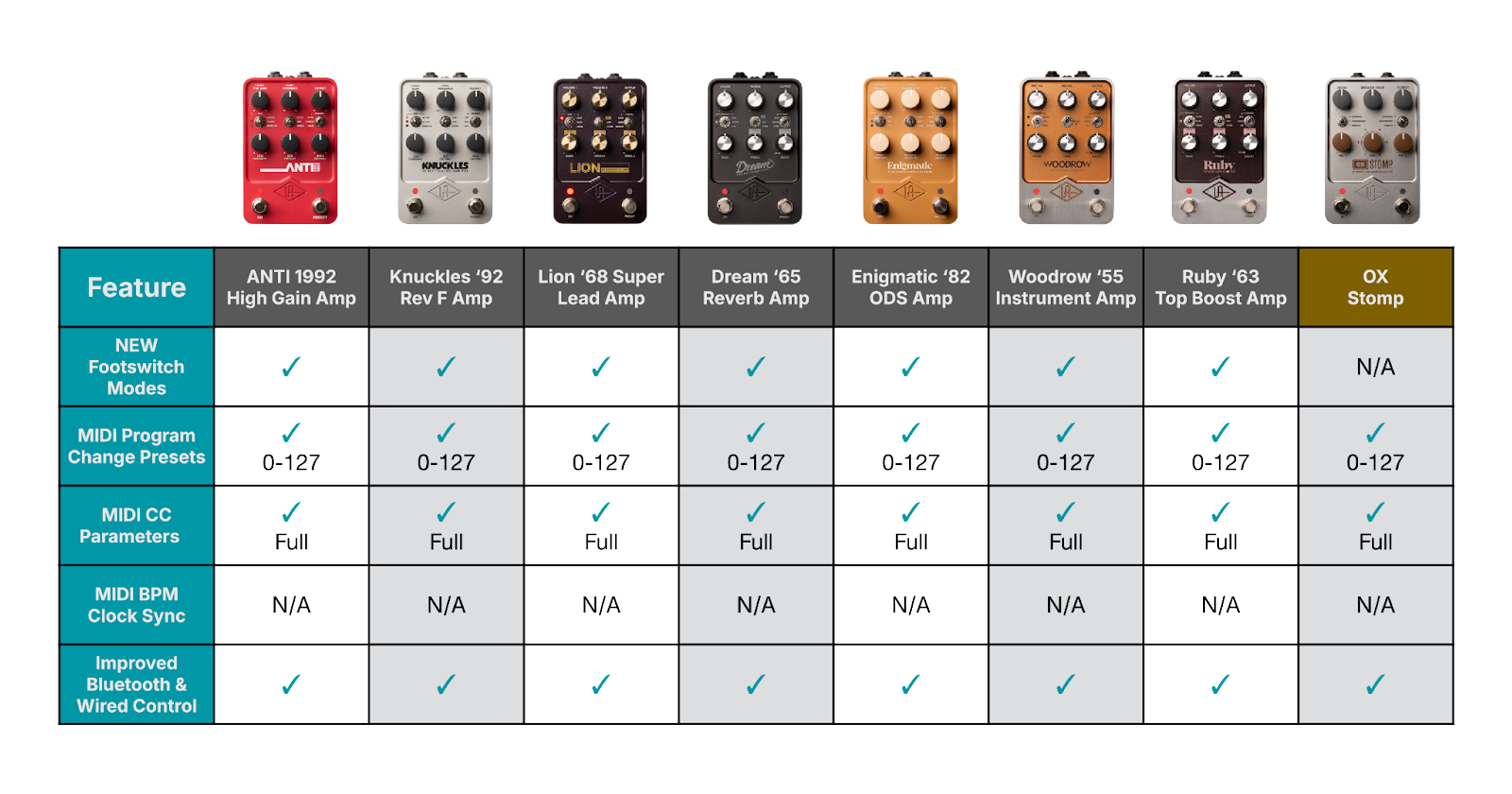
Features vary slightly depending on the pedal capabilities, so be sure to reference the charts below.
Tip: For operating instructions, including step-by-step procedures, see the UAFX Control Manual, the USB MIDI with UAFX Pedals Manual, and the individual UAFX Manuals for your particular pedal.
Equipment Summary
Important: To use the new Bluetooth and USB MIDI features, you need both UAFX firmware 2.0 or newer (available in the UA Connect app) and the UAFX Control mobile app 3.0 or newer. Get these apps here.
- One or more dual-footswitch UAFX pedals.
- A 9VDC power supply, capable of delivering 400 mA to each UAFX pedal, and power to your chosen USB host-capable MIDI interface.
- A USB Host Capable MIDI interface.
-
Appropriate USB Cabling, see our UAFX Cable & Power Guide for more information.
(USB cables, and a hub if you’re controlling more than one pedal) -
Appropriate audio cabling.
(your usual TS - Tip Sleeve instrument jacks) - An iOS or Android device to run the UAFX Control mobile app, which enables access to MIDI features.
- A computer with macOS Big Sur or newer, or Windows 10 or newer, to run UA Connect for UAFX firmware updates.
UAFX MIDI-capable pedals and features:
USB host-capable MIDI interfaces
There are many USB Host-capable MIDI interfaces available. Such devices have a USB port on them that is specifically labeled "Host". Devices range from simpler MIDI hubs to controllers with displays, and even those with loop switchers and MIDI control for the ultimate flexibility.
The MorningStar MC8 Pro is a popular choice for a USB host-capable MIDI interface, with a built-in USB host port, high-quality displays, footswitches, and an intuitive editor. This allows you to connect up to four UAFX pedals directly to its USB Host port, using a USB hub and USB cables. See our UAFX MIDI cable guide for more information.
A device like this allows you to send multiple MIDI commands with a single button press to as many pedals as you have connected. You can isolate the MIDI sent to individual pedals by setting them to a specific MIDI channel in UAFX Control. There are also bypass controls available, so you can activate or deactivate any of the connected pedals with a single button press.
Here is a helpful video that demonstrates how to control UAFX pedals by MIDI:
Here’s an example of a typical configuration:
This setup can be expanded with up to four UAFX pedals, using a simple USB hub. It’s possible to add a MIDI-controllable loop switcher like the MorningStar ML10X, which allows for pedal re-ordering and complex routing possibilities with many pedals.
You are only limited by the number of available virtual MIDI ports on your USB MIDI host interface. You can also use more than one USB MIDI host interface for a staggering number of connections.
Here are some additional examples:
Here is another example with eight UAFX pedals using a CME H2MIDI Pro as the USB MIDI host interface:
Bluetooth MIDI
UAFX pedals do not feature MIDI over Bluetooth.
However, as an example, it is possible to add Wireless Bluetooth by using 3rd-party hardware such as the CME H4MIDI WC interface with the optional Bluetooth WIDI Core module.*
An H4MIDI WC can be used with up to eight UAFX pedals connected by USB, and you can then connect a Bluetooth-capable MIDI switcher, such as the MorningStar MC8, to the H4MIDI WC wirelessly.
To add Bluetooth MIDI to a single UAFX pedal, the CME WIDI Uhost adapter would be a good choice.
*Note: UA does not directly support third-party hardware, and any questions regarding the named products should be directed to the product manufacturer. UA can assist with any UA product questions.
Hardware that has been tested with UAFX 2.0 MIDI
Note: MIDI is a universal standard, and any device that can output MIDI can communicate with UAFX, provided you have a suitable USB Host MIDI interface such as the CME H2MIDI Pro for connecting your UAFX pedals.
| Brand | Product | Type | Supports USB Host for direct connection to UAFX pedals | USB Host maximum UAFX pedals with direct connection |
| Morningstar | MC8 Pro | Footswitch controller with displays | Yes | 4 |
| Morningstar | MC6 Pro | Footswitch controller with displays | Yes | 4 |
| Morningstar | MC4 Pro | Footswitch controller with displays | Yes | 4 |
| CME | H2MIDI Pro | USB Host MIDI interface | Yes | 8 |
| CME | H4MIDI WC | USB Host and MIDI interface with optional WIDI Bluetooth module | Yes | 8 |
| Heavy Procrastination Industries | Mortrix | Footswitch controller with touchscreen display | Yes | 32 |
| GigRig | G3S | Loopswitcher with MIDI & footswitches | No | Requires USB Host MIDI Interface |
| GigRig | G3S Atom | Loopswitcher with MIDI & footswitches | No | Requires USB Host MIDI Interface |
| Disaster Area | DMC.micro Gen4 | Compact dual footswitch USB MIDI Host | Yes | 4 |
| Jet Pedals | Unity 6 | MIDI controller with touchscreen and built in loop switcher. | No | Requires USB Host MIDI Interface |
| RJM Mastermind | PBC/6X | Loopswitcher with MIDI control and programmable footswitches | No | Requires USB Host MIDI Interface |
| RJM Mastermind | PBC/10 | Loopswitcher with MIDI control and programmable footswitches | No | Requires USB Host MIDI Interface |